
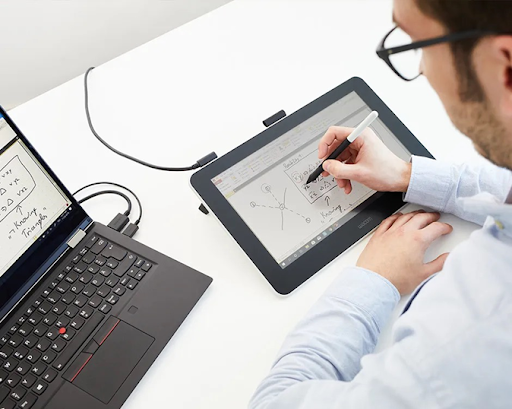
Topics: digital pen student
Introduction: The Reasons Behind Students’ Transition to Digital Pens and Tablets
Nowadays, students learn, take notes, and revise using technology, which is no longer simply a bonus in the classroom. Digital pens and tablets are among the most innovative inventions and are quickly becoming essential smart tools for learning. Students can combine the efficiency of digital storage, editing, and sharing with the genuine feel of handwriting using these devices, which differ from standard notebooks.
This article looks at the main benefits of digital pens and tablets, offers helpful tablet learning tips, and demonstrates how each student using a digital pen can improve their academic performance in terms of productivity, focus, and creativity.
Why Digital Pens and Tablets Are Academic Game-Changers
Technology and Writing
A digital pen instantly converts the text while imitating the natural writing technique. This allows students to make notes that are safe, accessible, and shareable while also writing equations, diagrams, or important lecture points.
Less Paper Mess
Students may save all of their material on one device compared to carrying around several notebooks. This promotes environmentally friendly study practices in addition to clearing the mess.
Flexibility and Availability
Digital pens and tablets help with note-taking for students with a range of learning tips. Customised learning experiences can be made possible by features like voice recording, highlighting, and zooming in.
Options for Students Using Digital Pens and Tablets
Different students require arrangements that vary. The primary categories are as follows:
- Pen Tablets: When used with a laptop, it is not highly priced and ideal for taking notes, drawing, and sketching.
- Pen Screens: Allowing students to write directly on the screen will improve the user experience and is ideal for innovative learners and visual appeal.
- Smart-pens: These use particular paper to record audio and handwriting, allowing notes to be selected to replay lectures. Ideal for students who would rather use pen and paper with digital backup.
👉 Advice: Before selecting the best digital pen, a student should assess their workflow to determine whether they require portability, drawing capabilities, or robust note-organisation features.
Tablet Learning Tips for Smarter Study
Organise by Subject and Topic
Use folders or tags to keep notes neatly divided. For example, one folder for “Economics” and subfolders for “Micro” and “Macro.”
Use Annotation Tools Effectively
Instead of just reading PDFs, highlight key terms, write side notes, and draw diagrams with your pen. This improves your memory as well.
Blend Audio and Handwriting
Pair lecture recordings with your notes. This makes revision faster since you can listen to explanations while reviewing your handwriting.
Visual Learning
Students studying difficult topics like biology or engineering can draw diagrams or mind maps directly on their tablet.
- Sync Across Devices
Try to back up notes to platforms like OneNote, Google Drive, or iCloud. This ensures you never lose valuable study material. Regularly Revise Digital Notes
Just like a physical notebook, digital notes need review. Schedule weekly “study reflection sessions” where you revisit and tidy up your stored lessons.
Additional Benefits:
Collaboration
Students can discuss ideas on a shared digital board, highlight readings, or share documented slides to make group projects more immersive.
Improved Focus in Classes
Writing with a digital pen increases active listening and engagement, in contrast to typing on a keyboard, which can be a bit diverting.
Opportunities for Creative Learning
The digital pen-and-tablet combination promotes interactive learning that accommodates various learning styles, from creating flowcharts to methodically resolving math problems.
Pens and Tablets: The Future of Digital Education
Even smarter pen technologies are expected in the future, such as immediate equation conversion into digital formats, AI-driven handwriting recognition, and ultra-low latency writing experiences. The use of these gadgets will only increase as more colleges use digital classrooms.
Students will benefit from more customised, effective, and interesting study techniques as a result, making digital pens and tablets important academic tools rather than a choice.
Conclusion
Being a digital pen student in the current competitive academic climate is about discovering more intelligent learning methods rather than acquiring a device. Combining the best features of handwriting, technology, and organisation, digital pens and tablets enable interactive note-taking, smooth collaboration, and improved revision.
Students can turn tablets into effective study tools by following the proper tablet learning instructions, which include arranging notes, combining audio, and editing on a regular basis
Digital pens and tablets are eventually more than just tools; they are smart study aids that set students up for success in the classroom in a highly technological future.
References
- “Digital Notes vs Paper Notes for 2025: Benefits of Taking Notes by Hand”, https://research.com/.(online).
FAQs
Q1. What is a digital pen student?
A digital pen student is someone who uses digital pens or smart pens alongside tablets or compatible devices to take notes, draw diagrams, and annotate learning material. These students combine traditional handwriting with digital technology, which allows for easier organization, sharing, and editing of their notes. The approach is designed to enhance productivity, focus, and creativity during study sessions.
Q2. How does being a digital pen student improve learning?
Being a digital pen student allows for interactive note-taking, audio integration, and seamless organization. Writing with a digital pen improves retention compared to typing, while syncing notes across devices ensures students can access material anytime. Additionally, annotation features help in highlighting key points and structuring lessons effectively.
Q3. Are digital pens better than traditional notebooks for students?
For a digital pen student, digital pens provide several advantages over traditional notebooks. Notes can be backed up, edited, and shared without losing clarity. Equations, diagrams, and visual content can be drawn easily. While traditional notebooks may feel natural, digital pens offer flexibility, collaboration, and eco-friendly benefits, making them ideal for modern learning.
Q4. What devices do digital pen students use?
A digital pen student typically uses tablets, 2-in-1 laptops, or pen tablets with stylus support. Popular options include Apple iPad with Apple Pencil, Samsung Galaxy Tab with S Pen, and Wacom tablets. Smart pens, which work with special paper or notebooks, are also used for recording handwritten notes digitally.
Q5. Can a digital pen student collaborate with classmates digitally?
Yes, collaboration is a key benefit for a digital pen student. Notes and annotations can be shared via cloud platforms such as OneNote, Google Drive, or iCloud. Students can highlight readings, provide comments, and work on group projects in real-time, enhancing collective learning experiences.
Q6. How does a digital pen student stay organized?
Organization is easier for a digital pen student. Notes can be categorized into folders, subjects, or topics. Features like tags, color-coding, and searchable handwriting allow students to quickly locate content. Regularly syncing notes and backing them up ensures nothing is lost and study sessions are more structured.
Q7. Does using a digital pen improve focus in class?
Writing with a digital pen can help a digital pen student stay more engaged compared to typing. The act of handwriting, even digitally, enhances active listening and retention. Features like annotation, drawing, and audio integration reduce distractions, allowing students to participate actively in lectures.
Q8. How does a digital pen student combine audio and notes effectively?
A digital pen student can pair lecture recordings with handwritten notes using compatible apps. For example, while writing diagrams or key points, the audio recording captures explanations. During revision, students can replay specific sections, which accelerates learning and ensures nothing is missed.
Q9. What study techniques are recommended for a digital pen student?
A digital pen student benefits from techniques like visual learning, mind mapping, and annotation. Highlighting key points, creating diagrams, or writing side notes directly on PDFs improves memory retention. Combining handwriting with audio and regularly revising digital notes maximizes the effectiveness of study sessions.
Q10. Are there creative advantages for a digital pen student?
Absolutely. A digital pen student can draw flowcharts, diagrams, and sketches directly on tablets. Creative exercises such as mind mapping or drawing problem-solving pathways enhance conceptual understanding. The interactive approach supports multiple learning styles, from visual to kinesthetic.
Q11. Can a digital pen student reduce paper usage?
Yes, one benefit for a digital pen student is reduced paper consumption. Instead of carrying multiple notebooks, students store all notes digitally. This eco-friendly approach also declutters study space and ensures all materials are safely backed up in one device or cloud platform.
Q12. How do digital pen students ensure their notes are secure?
Security is important for a digital pen student. Backing up notes to cloud services like Google Drive, OneNote, or iCloud ensures they are not lost. Password protection and device encryption further safeguard academic content from unauthorized access, giving students peace of mind.
Q13. Are smart pens different from digital pens for students?
Smart pens differ slightly but complement the digital pen student workflow. They record handwritten notes while also capturing audio. Notes are stored digitally and can be synced with devices. This hybrid approach is ideal for students who prefer writing on paper but want digital storage and playback capabilities.
Q14. How can a digital pen student maximize tablet learning?
To maximize productivity, a digital pen student should organize notes by subject, use annotation tools effectively, integrate audio recordings, draw diagrams, and sync notes across devices. Regular revision and collaborative exercises with classmates further enhance academic performance and retention.
Q15. What is the future for digital pen students?
The future is promising for a digital pen student. Advancements like AI-driven handwriting recognition, real-time equation conversion, low-latency writing, and smart annotation tools will make digital learning even more efficient. Colleges adopting digital classrooms will further enhance opportunities for personalized, interactive, and creative learning.
Penned by Nishant Bajaj
Edited by Sneha Seth, Research Analyst
For any feedback mail us at [email protected]
Transform Your Brand's Engagement with India's Youth
Drive massive brand engagement with 10 million+ college students across 3,000+ premier institutions, both online and offline. EvePaper is India’s leading youth marketing consultancy, connecting brands with the next generation of consumers through innovative, engagement-driven campaigns. Know More.
Mail us at [email protected]