
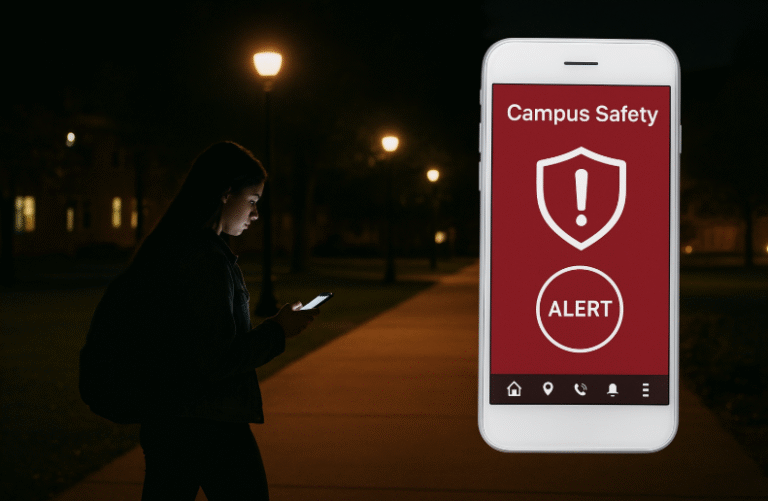
4 Essential Things for Students Walking Alone at Night
Safe Nights on Campus: How Mobile Safety Apps Protect Students
Every student has faced this thought: What if something goes wrong while I walk alone at night? Nighttime is unsafe, especially as a female student, with rising cases of harassment and rape that have put safety as the most important concern. Most of the students leave their native hometowns so that they can study in new cities. They live in hostels or PGs away from their family. Even a street, a bus stop or a dark lane feels strange. Feeling fear is normal in such instances. A phone can act as more than a device in an emergency situation. Students can feel safe with the use of student campus safety apps and digital alert tools.
Tap to Stay Safe: Why Mobile Security Matters for Students
Mobile phones have some hidden safety features. iPhones allow users to press three times on the power button to make an emergency call. Android users can configure the app Personal Safety to send their live locations or call emergency services in harm. These built-in tools are free and fast.
Safe Zone app is one of the leading examples. It is used in many universities around the globe. Students sign in without the use of campus email, and there is direct access to security teams. The single tap can trigger an emergency alert, first-aid request or alert when such employee will stay late in the library. The company creates a connection between the students and the campus security.
5 Best Student Campus Safety Apps and Digital Alert Tools
There are a lot of student campus safety apps and digital alert tools. Some of the most reliable are listed below-
- bSafe enables students to track their walking in real time. The app alert can be created with only one word. It allows Students to stream while walking.
- Red Panic Button is another app that installs a red button on the main screen. Messages and your location get sent to a list of contacts on a single tap.
- CampusSafe links students with campus police or emergency officials. It enables location sharing and fast incident reports.
- Noonlight is functional even beyond campus. On your walk, it arranges a timer. When you do not complete the check-in, it calls an emergency service and provides you with a location.
One reviewer on WIRED suggested, as an improvement, trying Noonlight: “a free app where you must familiarise yourself with the means of action at your disposal before you are in a critical situation.” That is the gist of digital safety. The tool will be of no help when you are not aware of how to use it.
Training Day-to-Day Behaviours in Safety
Technology is great with smart habits. The students can attempt the following:
- Students can use WhatsApp to share live location with trusted peers when they are out alone.
- They should train themselves on how to use panic buttons effectively under safe conditions.
- Students should familiarise themselves with campus shuttles or ride shares that run at night.
- Additionally, maintain the phone battery charge or carry a power bank along. They must include trusted numbers in the short dialling list.
Final Thought
As students, you have a right to feel safe on your campus. The issue of safety is not an option for women in particular but rather a right. A student campus safety app, digital alert tools, and online alert technologies will not eliminate risk, but they will reduce it. They can transform fear into a sense of security and silence into communication. “Safety increases where technologies and awareness intersect.”
References
- Times Higher Education, “Apps and services for keeping safe when studying away from home.” [Online]. Available: https://www.timeshighereducation.com/student/advice/apps-and-services-keeping-safe-student-studying-away-home
- SafeZone, “SafeZone App.” [Online]. Available: https://safezoneapp.com/
- Google Support, “Use Personal Safety app on Android.” [Online]. Available: https://support.google.com/android/answer/9319337?hl=en#:~:text=You%20can%20use%20the%20Personal,regions%20and%20with%20certain%20carriers
- A. Robertson, WIRED, “Which personal safety app is best for me?” [Online]. Available: https://www.wired.com/gallery/which-personal-safety-app-is-best-for-me/
FAQs on Student Campus Safety Apps
1. What are Student Campus Safety Apps?
Student Campus Safety Apps are mobile applications specially designed to help students stay safe within and around their campuses. These apps allow real-time location sharing, emergency alerts, and instant contact with campus security teams. By using Student Campus Safety Apps, students can transform their smartphones into personal safety tools that ensure protection and quick response in risky situations.
2. Why are Student Campus Safety Apps important for college students?
Student Campus Safety Apps are important because they provide a sense of security, especially when students are walking alone at night or staying late in libraries. Many universities integrate such apps into their safety systems, making them essential for emergency communication. Student Campus Safety Apps help reduce fear and empower students to act confidently in uncertain environments.
3. How do Student Campus Safety Apps work?
Most Student Campus Safety Apps work through GPS tracking and emergency connections. When students feel unsafe, they can press a single button to share their live location or alert authorities. These apps can automatically contact emergency services if the student fails to respond within a set time. Student Campus Safety Apps function as a digital bridge between students and campus protection services.
4. Which are the best Student Campus Safety Apps available today?
Some of the most reliable Student Campus Safety Apps include SafeZone, bSafe, CampusSafe, Red Panic Button, and Noonlight. These apps provide unique safety features like live tracking, voice-activated alerts, and quick links to emergency contacts. Universities across the world encourage students to download these Student Campus Safety Apps for instant support.
5. Are Student Campus Safety Apps free to use?
Yes, many Student Campus Safety Apps are free or offer basic versions without cost. Apps like SafeZone and Noonlight provide free access to essential tools such as live location sharing and panic alerts. However, some Student Campus Safety Apps offer premium features at a small price, such as advanced tracking or video streaming.
6. Can Student Campus Safety Apps work without the internet?
Certain Student Campus Safety Apps can send emergency SMS or call pre-saved contacts even without an internet connection. However, for full functionality like live tracking or campus security integration, an active data connection is preferred. The latest Student Campus Safety Apps are designed to switch automatically between Wi-Fi, data, and SMS networks for reliability.
7. Do universities officially support Student Campus Safety Apps?
Yes, several universities partner with developers to implement Student Campus Safety Apps as part of their security infrastructure. These apps are linked to campus police and emergency teams, making them official safety tools. Using Student Campus Safety Apps enhances campus safety management and builds trust among students and parents alike.
8. How can students make the best use of Student Campus Safety Apps?
To get the best results, students should familiarize themselves with the app’s features before emergencies occur. They can set trusted contacts, enable location sharing, and test panic buttons regularly. Student Campus Safety Apps are most effective when combined with personal awareness and safe practices.
9. Are Student Campus Safety Apps useful for international students?
Absolutely. Student Campus Safety Apps are particularly beneficial for international students who may be unfamiliar with local emergency services. These apps help them navigate safely, reach security easily, and feel more confident while studying abroad. Student Campus Safety Apps remove language and communication barriers during emergencies.
10. Can Student Campus Safety Apps completely eliminate danger?
No app can remove all risk, but Student Campus Safety Apps can significantly reduce it. They enhance awareness, promote responsible behavior, and ensure immediate help in emergencies. Student Campus Safety Apps are tools that turn fear into confidence, making every student’s journey safer and smarter.
Penned by Priyanka Bambhu
Edited by Shashank Kandelwal, Research Analyst
For any feedback mail us at [email protected]
Transform Your Brand's Engagement with India's Youth
Drive massive brand engagement with 10 million+ college students across 3,000+ premier institutions, both online and offline. EvePaper is India’s leading youth marketing consultancy, connecting brands with the next generation of consumers through innovative, engagement-driven campaigns. Know More.
Mail us at [email protected]