
Topics: Hypervisors, Virtual Machines
Introduction
IT plays a vital role in this modern era. IT, scalability, flexibility and efficiency are some key requirements for computing. In traditional computing models, where a single operating system is used to operate the system on a single physical server, this often results in certain disadvantages and challenges, such as underutilised hardware, higher costs, and limited adaptability. To overcome these disadvantages and challenges, virtual technologies emerged as a powerful solution.
A Virtual machine is a software that enables a physical computer to run its own operating system and apps with virtualised resources. It’s different from the host system, allowing users to perform secure tasks like testing apps or using different operating systems while optimizing physical hardware. It comprises components such as processors, memory, storage, network interfaces.
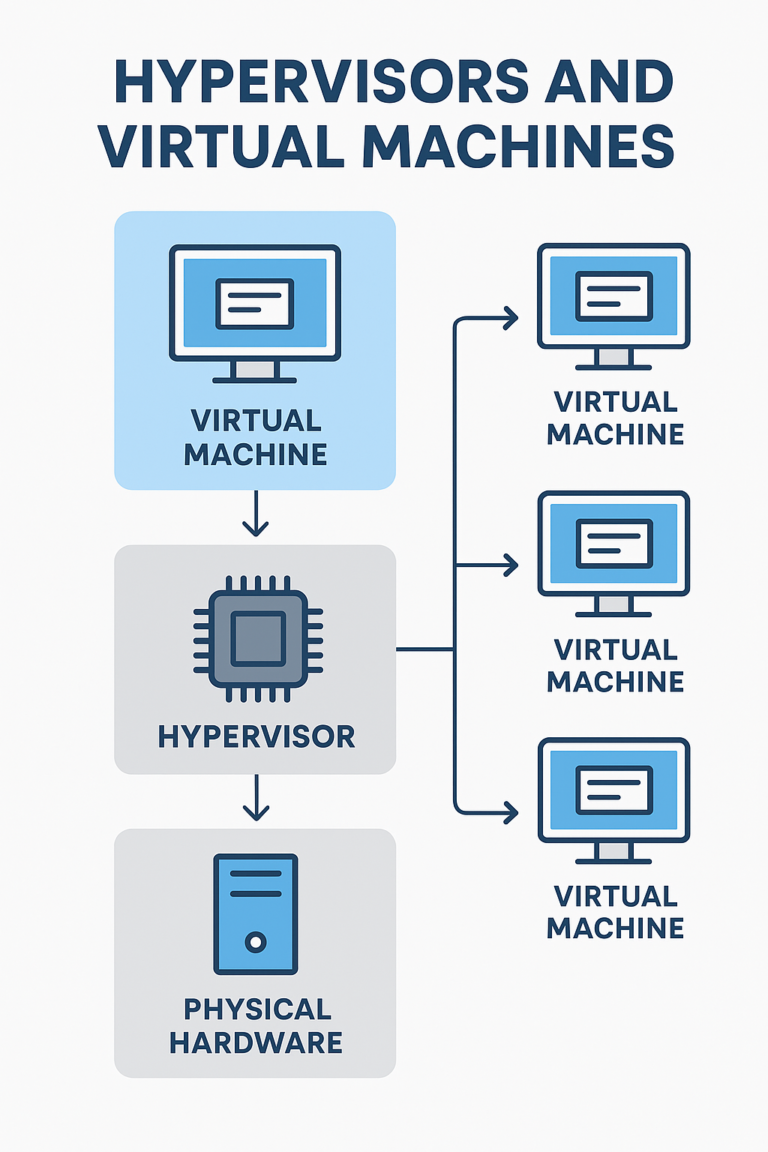
The technology that enables virtual machines to function is known as hypervisor. Hypervisor is a software that you can use to run multiple machines on a single physical machine, and every virtual machine has its own operating system and applications. The hypervisor ensures that the virtual machine receives the required computing resources while preventing conflicts and maintaining isolation. It also manages CPU time, memory usage and facilitates communication between virtual machines and the underlying software.
Working of a Virtual Machine
Virtualisation is a complex process through which a software-based, or virtual, version of a computer is created. This virtual machinery is allocated specific portions of CPU, memory and storage from a physical host computer, such as your personal device or a remote server located in a cloud provider’s data centre.
A Virtual machine is a computer file, often referred to as an image, that functions like a physical computer. It operates as an independent computing environment, often to run a different OS or act as the user’s entire computer experience. The virtual machine is isolated from the rest of the system, so that the software within the VM can’t interfere with the host computer’s primary operating system.
Working of Hypervisor
System administrators install the hypervisor software on physical servers. The hypervisor loads the virtual machine images to create multiple virtual operating systems. The physical machines are called as the host, and the virtual operating systems are guests.
Resource Allocation
The hypervisor ensures that every virtual machine receives the allocated resources as specified. It does so by acting as an intermediary between guest machines and the underlying physical hardware. The hypervisor relays requests for processing power, memory, storage, and other resources to the host machine in several ways, including API calls.
Hypervisor Types
There are two types of hypervisors. Each of them is different in architecture and performance.
Type 1 Hypervisor
It is on the top of the mental server and has direct access to the hardware resources. They are also known as bare-metal hypervisors and are installed directly on the physical hardware and they are not needed for the operating system. As they interact directly with hardware components, they offer high performance, low latency and strong security.
Type 2 Hypervisor
It is installed on a host operating system and run on the top of an existing operating system. In this the host operating system acts as an intermediary between the hypervisor and the hardware. Like other software applications, hosted supervisors do not have complete control of the computer resources. Instead, the system administrator allocates the resources for the hosted hypervisor, which it distributes to the virtual machines.
Conclusion
Hypervisors and Virtual machines both have changed modern computing and have enabled efficient, flexible and scalable use of hardware sources. Each of the hypervisors and virtual machines form a cloud computing, virtual data centres and modern IT infrastructure to allow multiple operating systems to run on a physical machine. As many organisations have adopted digital transformation the hypervisors and virtual machines will continue to grow for future computing environments.
References
[1] Microsoft Azure. What is a virtual machine? Microsoft Azure Cloud Computing Dictionary. [Online]
Available:https://azure.microsoft.com/en-us/resources/cloud-computing-dictionary/what-is-a-virtual-machine
[2] Amazon Web Services. What is a hypervisor? Amazon Web Services. [Online]
Available:https://aws.amazon.com/what-is/hypervisor/
FAQs
Q1. What is a hypervisor in simple terms?
A hypervisor is software that creates and manages isolated virtual environments on one physical computer.
Q2. What is a virtual machine?
A Virtual Machine is a software-based computer file that runs its own OS and apps independently.
Q3. How do hypervisors help IT systems?
They allow multiple operating systems to run safely on one physical server without conflicts.
Q4. What is the difference between Type 1 and Type 2 hypervisors?
Type 1 runs directly on hardware, while Type 2 runs on top of an existing operating system.
Q5. Why are virtual machines isolated from host systems?
To prevent software inside the guest system from interfering with the main operating system or files.
Q6. Can students test apps using virtual machines?
Yes, a Virtual Machine lets users test apps safely without affecting their main computer.
Q7. What is over-allocation risk in virtual systems?
It happens when resources like memory or CPU are assigned beyond what the physical host can support.
Q8. How do organizations manage VM resources?
Administrators assign portions of CPU, storage, and memory to each guest system using management tools.
Q9. What is the future of virtual machines in IT?
More cloud adoption, smarter automation, and stronger security tuning for VM environments.
Q10. Do virtual machines replace physical computers?
No, they optimize physical hardware but act as independent guest systems for specific tasks.
Penned by Divisha
Edited by Isha Yadav, Research Analyst
For any feedback mail us at [email protected]
Transform Your Brand's Engagement with India's Youth
Drive massive brand engagement with 10 million+ college students across 3,000+ premier institutions, both online and offline. EvePaper is India’s leading youth marketing consultancy, connecting brands with the next generation of consumers through innovative, engagement-driven campaigns. Know More.
Mail us at [email protected]